You’ll learn (and assumptions)
You’ll learn how Linux:
- translates virtual addresses into physical frames (and what a page fault really means)
- decides what stays in RAM via reclaim (page cache vs anonymous memory, active/inactive LRUs)
- uses swap (disk or compressed RAM) under pressure
- ends up in global OOM or cgroup OOM, and how to investigate
Audience: beginner-to-intermediate Linux users (you’ve used top/free, but VM internals are fuzzy).
Assumptions (so the examples match your system):
- Architecture: x86_64
- Kernel: “typical distro defaults” (Ubuntu/Fedora/Debian-like)
- Page size: usually 4 KiB (unless huge pages are in play)
- Swap: may be enabled (swap partition/file) and/or compressed swap (zram/zswap). I’ll call out where behavior differs if swap is off.
Follow along: what “free” vs “available” means
Before internals, anchor your intuition with what Linux reports.
- High-level snapshot
free -h
Focus on:
- free: completely unused RAM right now
- available: RAM the kernel estimates it can provide to applications without causing major disruption (by dropping clean cache, reclaiming some slabs, etc.)
If free is low but available is healthy, the system is often fine—Linux is using spare RAM as cache.
- The raw ingredients
cat /proc/meminfo | head -n 30
Look at (names vary slightly by kernel):
MemTotal,MemFree,MemAvailableCached/BuffersActive(file),Inactive(file),Active(anon),Inactive(anon)SwapTotal,SwapFreeSReclaimable(reclaimable slab) vsSUnreclaim(unreclaimable slab)
Why “available” matters more than “free”: much of “used” memory is page cache (file data) that can be dropped quickly when applications need RAM. This ties directly to reclaim behavior later.
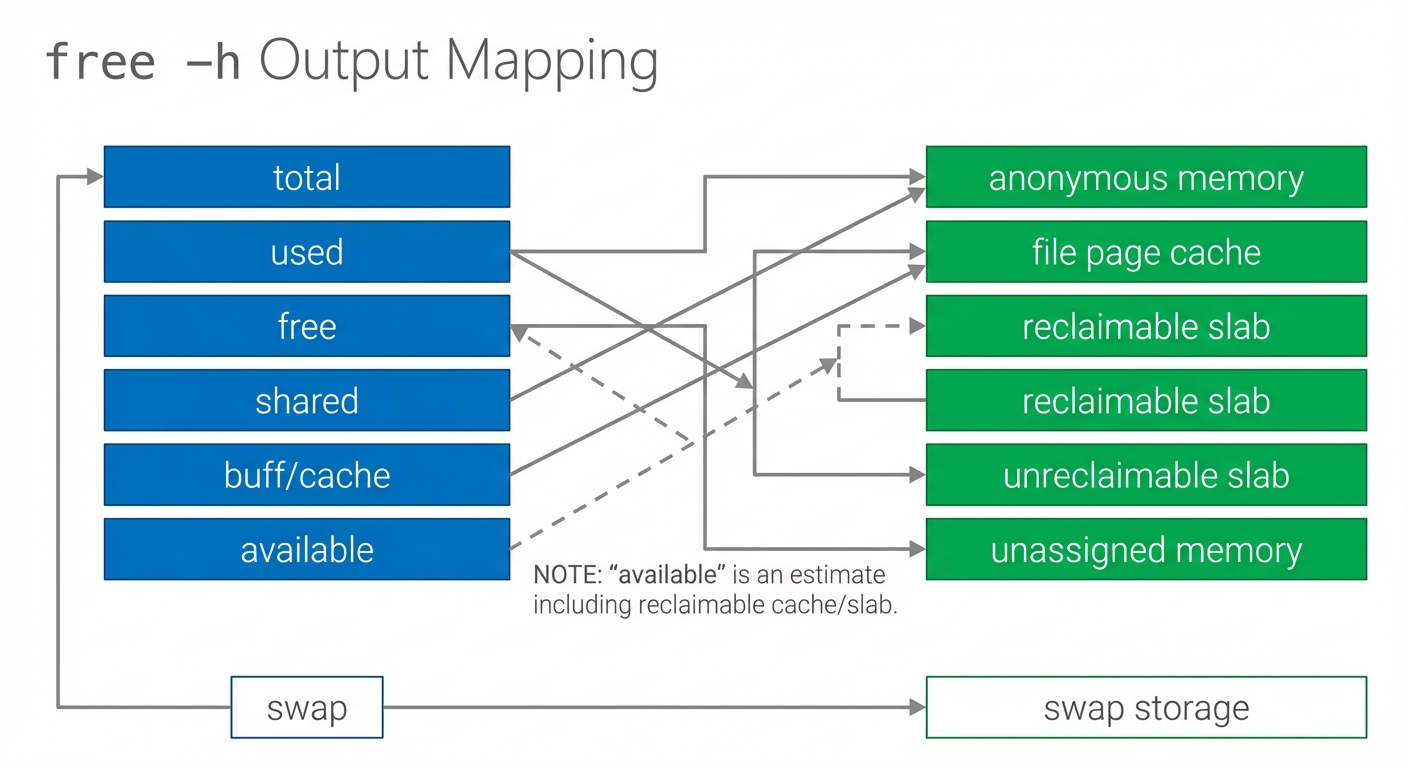
Figure: free -h fields mapped to underlying concepts—page cache and reclaimable slab contribute to “available.” Notice that “used” is not synonymous with “unavailable.”
The core idea: virtual memory (the big illusion)
When people say “Linux manages memory,” it’s not just tracking a scoreboard of used/free RAM. Linux is continuously mapping what programs think they have (virtual memory) onto what the machine actually has (physical RAM), using storage as a pressure-release valve.
A single analogy to keep throughout: RAM is a busy kitchen countertop—fast and limited. The kernel tries to keep the most useful things on the counter, and it can put some things away (disk/swap) when space gets tight.
Virtual address space → physical frames
Each process gets its own virtual address space: a large, private, contiguous range of addresses. Those addresses are translated by the CPU’s MMU using page tables.
- A page is a fixed-size chunk of virtual memory (commonly 4 KiB).
- A frame is a fixed-size chunk of physical RAM (a physical page frame).
So the fundamental mapping is:
virtual page → physical frame (or “not present”)
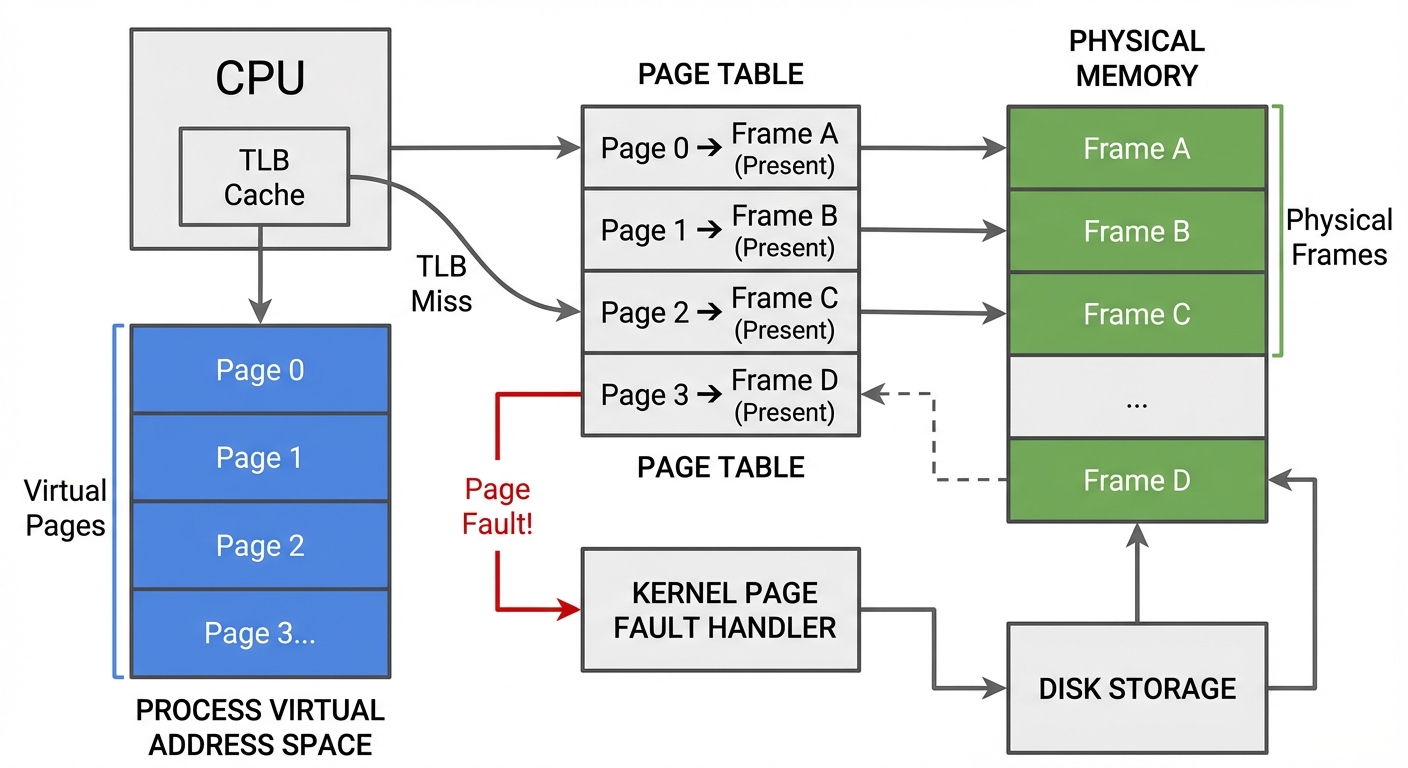
Figure: Virtual pages translated via page tables into physical frames; some pages are unmapped or point to file-backed storage. Notice that each process has its own page tables.
TLB and page tables (fast path vs slow path)
On each memory access:
- CPU checks the TLB (a cache of recent translations).
- On a TLB miss, hardware walks the page tables in memory.
- If the page is present and permissions allow it, the load/store proceeds.
- Otherwise, the CPU triggers a page fault, and the kernel handles it.
Minor vs major page faults (performance difference)
A “page fault” is not automatically an error.
- Minor page fault: the page is not currently mapped for this process but the data is already in RAM (e.g., a shared page cache page, or a new anonymous page that can be zero-filled). Minor faults are usually much cheaper.
- Major page fault: the data is not in RAM and must be fetched from storage (disk/SSD) (e.g., reading a memory-mapped file page that isn’t cached, or swapping a page back in). Major faults are much more expensive and can cause visible stalls.
You can observe faults with tools like vmstat (later in Next steps).
Copy-on-write (CoW): why memory “feels bigger”
Virtual memory also enables copy-on-write:
- After
fork(), parent and child initially share the same physical frames for anonymous memory. - Only when one process writes to a shared page does the kernel copy it (a CoW fault) so each process gets its own private version.
This saves RAM and speeds up process creation, but it also interacts with overcommit: a process can appear to have lots of memory reserved while the system hasn’t actually paid the full physical cost yet.
Paging: why fixed-size pages are the unit of decision-making
Linux manages memory in pages because it needs a uniform unit for:
- mapping (virtual page → physical frame)
- tracking access/recency
- reclaiming and evicting
Tradeoffs:
- Internal fragmentation: small allocations can consume whole pages.
- TLB pressure: more pages means more translations.
Linux can use huge pages (e.g., 2 MiB) to reduce TLB pressure for large contiguous regions.
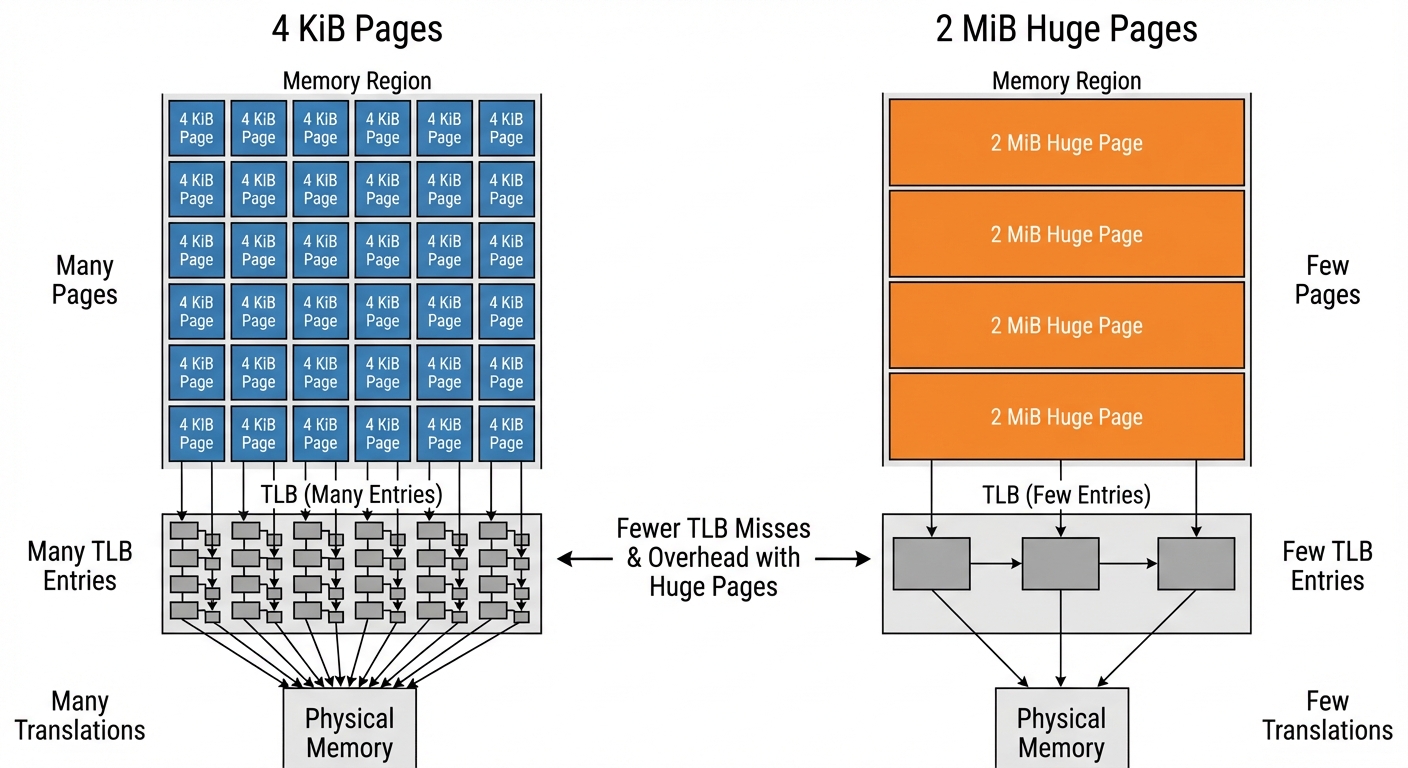
Figure: Many 4 KiB pages vs fewer 2 MiB huge pages. Notice how huge pages reduce the number of TLB entries needed for the same memory range.
Page cache and memory-mapped files (it’s the same cache)
The page cache is RAM used to cache file contents. If you read a file, Linux keeps its pages in memory to speed up future reads.
Important clarification:
- Memory-mapped files (
mmap) and “regular file reads” both ultimately use the same underlying page cache pages. - A file page can be accessed either via
read()into a buffer or by mapping it and dereferencing pointers—either way, the backing storage is the page cache.
This is a big reason “used memory” can be healthy: the cache is doing useful work and is often reclaimable.
Reclaim: how Linux decides what stays on the “countertop”
RAM holds a mix of:
- Anonymous pages (heap/stack; not backed by files)
- File-backed pages (page cache, memory-mapped files)
- Kernel memory, including slab allocations:
- Reclaimable slab (often shows up as
SReclaimable) - Unreclaimable slab (
SUnreclaim), plus pinned/locked pages
- Reclaimable slab (often shows up as
When memory pressure rises, Linux runs reclaim: it tries to free frames while minimizing harm.
Reclaim is not a fixed “cache first, then swap” order
It’s tempting to describe reclaim as a simple sequence (“drop clean cache, then write dirty, then swap anon”). That’s a useful intuition, but it’s not a strict global rule.
Linux uses multiple LRU-like lists and reclaims proportionally and heuristically based on what’s present and what seems least costly:
- separate LRUs for file-backed vs anonymous pages
- within each, active vs inactive lists
Roughly:
- Pages that haven’t been used recently drift toward inactive.
- Reclaim tends to scan and evict from inactive lists first.
- Whether file or anon gets reclaimed more depends on pressure, ratios, and what’s actually reclaimable.
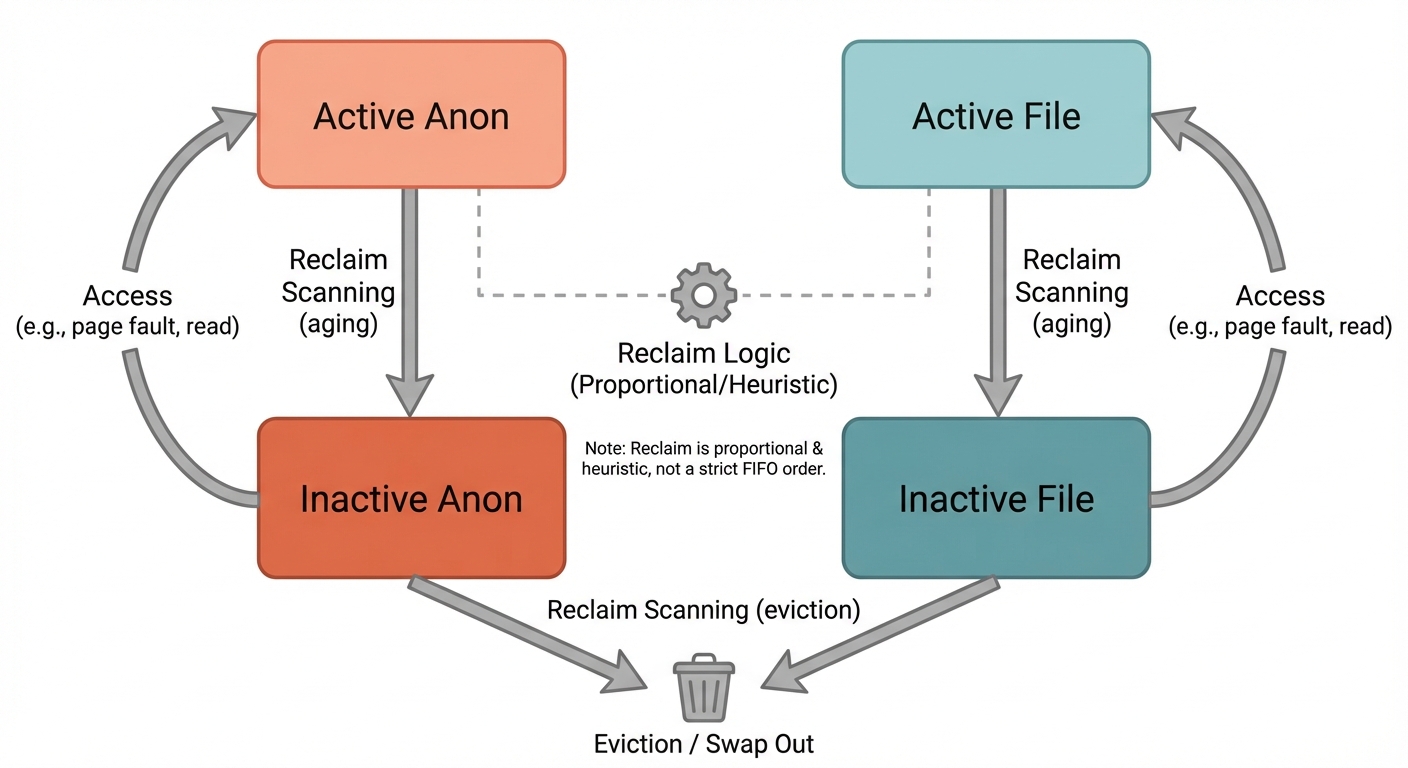
Figure: Active/inactive LRUs split by file vs anon. Notice that reclaim typically targets inactive lists, and the balance between file/anon is heuristic-driven rather than a single fixed order.
Clean vs dirty file-backed pages (why writeback matters)
- Clean file-backed page: matches disk → can be dropped quickly.
- Dirty file-backed page: modified → must be written back before it can be reclaimed.
Writeback consumes I/O bandwidth and can amplify latency under pressure.
Kernel memory: reclaimable vs unreclaimable (common OOM contributor)
Not all “used” RAM is equally negotiable.
- Reclaimable slab can be freed under pressure.
- Unreclaimable slab cannot be freed easily (or at all) and can grow due to workloads, drivers, networking, filesystem metadata, eBPF maps, pinned pages, etc.
If unreclaimable kernel memory grows large, you can hit OOM even when user-space processes don’t look huge.
Swap (disk, zram, zswap): what it does and knobs that change behavior
Swap stores evicted anonymous pages outside of RAM.
- With swap enabled, the kernel has another place to put cold anonymous pages, which can prevent OOM during spikes.
- With swap disabled, reclaim has fewer options; under pressure you’re more likely to hit OOM earlier.
Swap can be:
- traditional swap partition/file on disk
- zram: compressed swap in RAM (trades CPU for effective capacity)
- zswap: compressed cache in RAM in front of disk swap
A key knob:
vm.swappinessinfluences how aggressively the kernel prefers reclaiming anonymous memory via swapping vs reclaiming file cache. (It’s not a simple “swap on/off” switch, but it changes the tendency.)
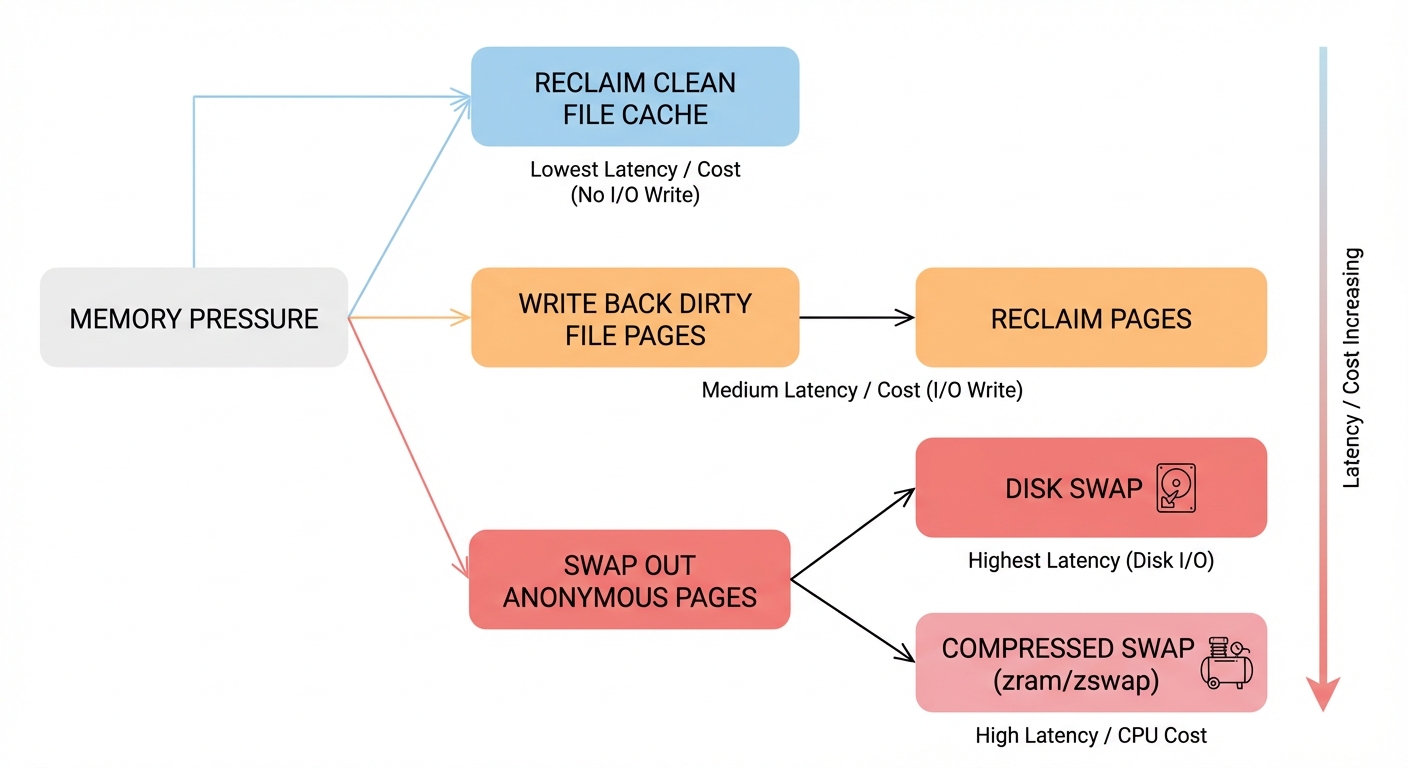
Figure: Reclaim options under pressure: dropping clean file cache, writing back dirty file pages, swapping anonymous pages to disk or compressed swap. Notice the latency differences between paths.
Overcommit: reservation vs committed/charged memory
A common source of confusion is mixing:
- Address space reservation: a process reserves a virtual range (e.g.,
mallocreturns a pointer, ormmapreserves space). This may not immediately allocate physical frames. - Committed/charged memory: memory the kernel promises it can back with RAM and/or swap when pages are actually used.
Linux supports overcommit, meaning it may allow reservations beyond what is safely backable if every process touched every page.
Two key concepts:
- Commit limit: a rough upper bound of memory the kernel is willing to commit, often related to RAM + swap and the overcommit policy.
- Overcommit policy knobs:
vm.overcommit_memory(policy mode)vm.overcommit_ratio(affects commit limit calculation in some modes)
You can inspect:
cat /proc/meminfo | egrep 'CommitLimit|Committed_AS'
Committed_ASis the amount of memory promised (committed) to processes.- If commitments grow too high relative to
CommitLimit, later page faults that require real backing can fail—leading to OOM-like outcomes.
CoW can make this feel surprising: after fork(), memory looks “allocated” in virtual space, but the physical cost may only arrive on write.
NUMA and locality: “free memory” might be on the wrong node
On NUMA systems (common on multi-socket servers, and sometimes high-end desktops), memory is split into nodes with different access costs.
- Allocations often prefer local-node memory for performance.
- “Free memory” on another node may not help immediately without migration or remote access penalties.
So you can see scenarios where the system has free memory overall, but allocations on a specific node struggle—supporting the idea that “free bytes” isn’t the whole story.
When OOM happens: global OOM vs cgroup OOM
Linux tries reclaim first (drop cache, write back, swap, reclaim slab where possible). OOM happens when the kernel can’t free enough memory to satisfy an allocation that must succeed.
Global OOM
Global OOM affects the whole machine. The kernel selects a process to kill based on a “badness” heuristic (oom_score) influenced by memory usage and adjustments like oom_score_adj.
cgroup (container) OOM
In containers, memory is often controlled by cgroups:
memory.max: hard limit; exceeding it can trigger a cgroup-scoped OOM kill even if the host has plenty of RAM.memory.high: throttling/pressure mechanism; exceeding it can trigger reclaim and slowdowns before a hard OOM.
This is the common reason for: “Why did my container die when the host had free memory?”
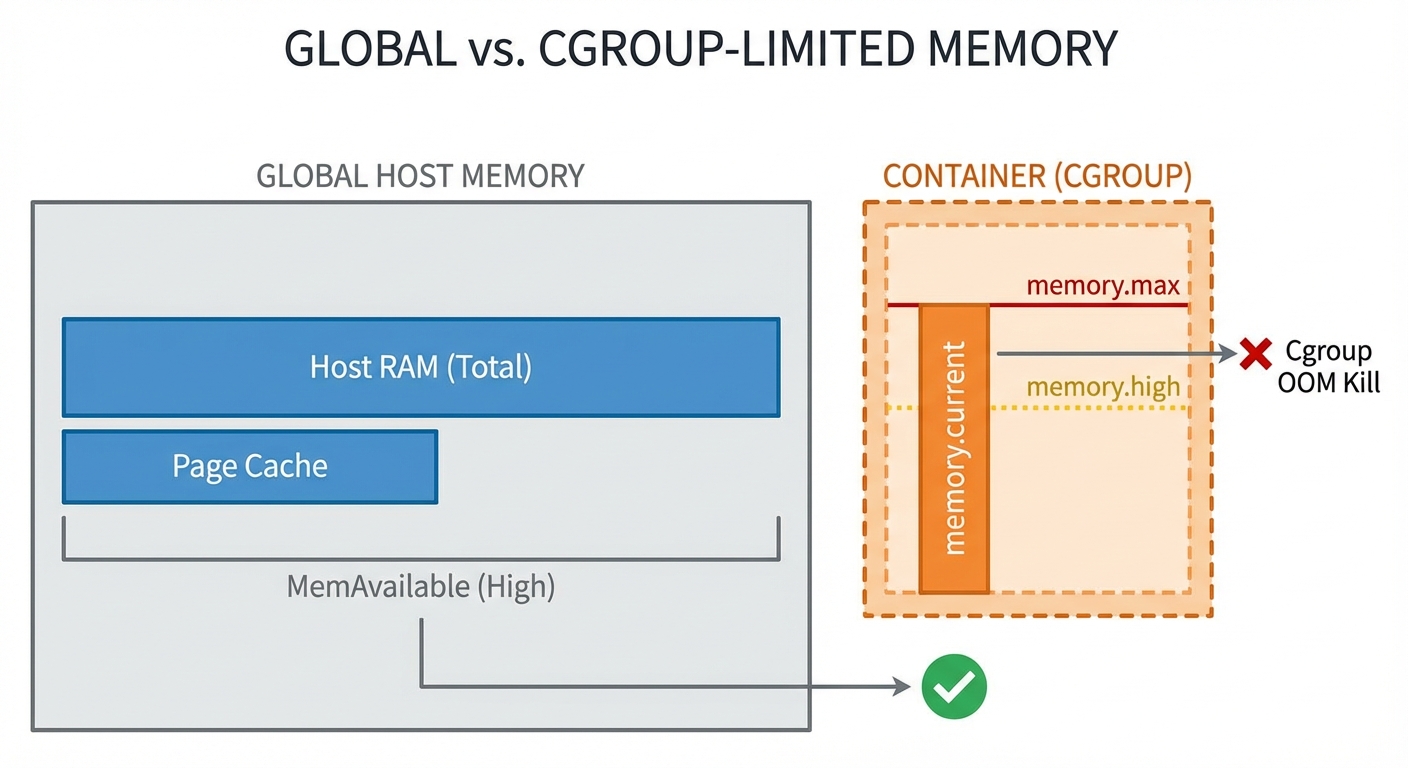
Figure: Global vs cgroup memory accounting. Notice that a container can hit memory.max and be OOM-killed inside the cgroup while the host still has available memory.
“But there was free memory”: concrete constraints (not hand-waving)
Sometimes an allocation fails (or triggers OOM) despite “free-ish” memory. Reasons include:
- High-order allocations: the kernel may need a physically contiguous block (order > 0). Even with plenty of total free memory, fragmentation can prevent finding a contiguous run.
- Memory zones / constraints: some allocations must come from specific zones (e.g., DMA/DMA32) or have flags like
GFP_DMA,GFP_ATOMIC, etc. A constrained zone can be exhausted while others have free pages. - Pinned/unreclaimable memory: pages locked in RAM (mlock), long-lived unreclaimable slab, or device-pinned pages reduce what reclaim can actually free.
The takeaway: availability is shaped by contiguity, zone constraints, and reclaimability, not just totals.
Observability: what to check during or after OOM
When an OOM kill happens, start here:
- Kernel logs:
dmesg -T | lessjournalctl -k -b | less- (distro-dependent)
/var/log/kern.log
Look for lines mentioning:
Out of memory: Killed process ...oom-kill:- cgroup paths if it’s a cgroup OOM
Inspect a process’s OOM likelihood knobs:
cat /proc/<pid>/oom_score
cat /proc/<pid>/oom_score_adj
For cgroups, inspect limits and current usage (paths vary by cgroup v2 mount):
cat /sys/fs/cgroup/<group>/memory.max
cat /sys/fs/cgroup/<group>/memory.high
cat /sys/fs/cgroup/<group>/memory.current
End-to-end scenario: what memory pressure looks like in steps
A realistic “pressure story” on a machine with swap enabled:
- You start a memory-hungry job (allocates and touches anonymous pages).
MemAvailabledrops; reclaim begins scanning inactive LRUs.- The page cache shrinks (file-backed inactive pages reclaimed) → file I/O may get slower.
- If pressure continues, the kernel starts swapping out inactive anonymous pages → latency spikes; you may see major faults when swapped pages are needed again.
- If reclaim can’t keep up (or swap is exhausted/disabled, or unreclaimable memory is high), the system hits OOM.
- Kernel kills a process (global or cgroup-scoped), freeing memory abruptly; logs record the event.
Metrics that typically change:
free -h:availablefalls; swap usage may rise/proc/meminfo:Active/Inactiveshifts;Dirtyand writeback fields may growvmstat: risingsi/so(swap in/out), and major faults correlate with stalls
Common misconceptions (quick box)
- “Low free memory is bad.” Often false; Linux uses RAM for page cache. Watch available.
- “A page fault means something broke.” Often false; minor faults are normal. Major faults are the expensive ones.
- “Swap is extra RAM.” Not really; it’s a survival buffer. Heavy swapping can destroy performance.
- “OOM only happens when RAM is full.” OOM can happen with apparent free memory due to constraints (zones, high-order allocations), unreclaimable memory, or cgroup limits.
Next steps: tools and references
Commands to deepen your intuition:
vmstat 1(watch swap in/out, run queue, IO-ish signals)sar -B 1(paging activity; requires sysstat)perf stat -e page-faults,major-faults <cmd>(fault cost visibility)smem(PSS breakdown; better than RSS for shared memory)cat /proc/pressure/memory(PSI: memory pressure signals, if enabled)
Good official docs to go further:
- Linux kernel documentation on VM (MM, reclaim, page cache)
- cgroups v2 memory controller docs (for
memory.max,memory.high, OOM behavior)
Closing intuition
Linux memory management is a set of educated bets:
- Illusions: virtual memory + CoW make processes feel like they have large private memory.
- Chunks: paging makes memory manageable in uniform units.
- Predictions: reclaim uses LRU-like heuristics to keep the working set in RAM.
- Pressure valves: page cache shrink, writeback, and swap absorb spikes.
- Last resort: global or cgroup OOM kills protect overall system stability.
If you can explain memory behavior in those terms—and verify it with free, /proc/meminfo, and kernel logs—you understand the core of how Linux decides what stays in RAM.
Test Your Knowledge
30 questions
1. In the output of `free -h`, what does the `available` field represent?
2. If `free` memory is low but `available` memory is healthy, what is the most accurate interpretation?
3. Which `/proc/meminfo` fields most directly correspond to the idea of reclaimable vs unreclaimable slab memory?
4. What is the fundamental mapping performed by the virtual memory system?
5. Which hardware component performs virtual-to-physical address translation using page tables?
6. What is the typical page size assumed in the post for x86_64 systems (unless huge pages are used)?
7. What is a TLB in the context of memory management?
8. What happens on a TLB miss during a memory access?
9. Which statement best describes a minor page fault?
10. Which statement best describes a major page fault?
11. Why are major page faults typically more expensive than minor page faults?
12. What is the key idea behind copy-on-write (CoW) after `fork()`?
13. How does paging help Linux manage memory?
14. What is one tradeoff of using many small pages (e.g., 4 KiB) instead of huge pages?
15. What is a primary benefit of huge pages (e.g., 2 MiB) mentioned in the post?
16. What is the page cache used for?
17. How do memory-mapped files (`mmap`) relate to the page cache?
18. Which type of memory is described as heap/stack and not backed by files?
19. Which of the following is an example of file-backed memory discussed in the post?
20. What does Linux memory reclaim attempt to do under memory pressure?
21. How does the post characterize reclaim order (e.g., cache first then swap)?
22. Which LRU-like separations are mentioned as part of Linux reclaim behavior?
23. Reclaim tends to target which pages first, according to the post?
24. What is the difference between clean and dirty file-backed pages in reclaim?
25. Why can writeback worsen latency during memory pressure?
26. Which statement about unreclaimable slab memory is most accurate per the post?
27. What does swap primarily store when the kernel evicts memory from RAM?
28. According to the post, what is a key benefit of having swap enabled?
29. What is zram as described in the post?
30. What does `vm.swappiness` influence?